Chrome extension · checking version

GitHub Projects,
reloaded.

Small, focused UI upgrades for the gaps GitHub leaves behind. See whose move it is on pull requests, run clearer standups and organize your work by project.

MIT licensed · Manifest V3 · Open source
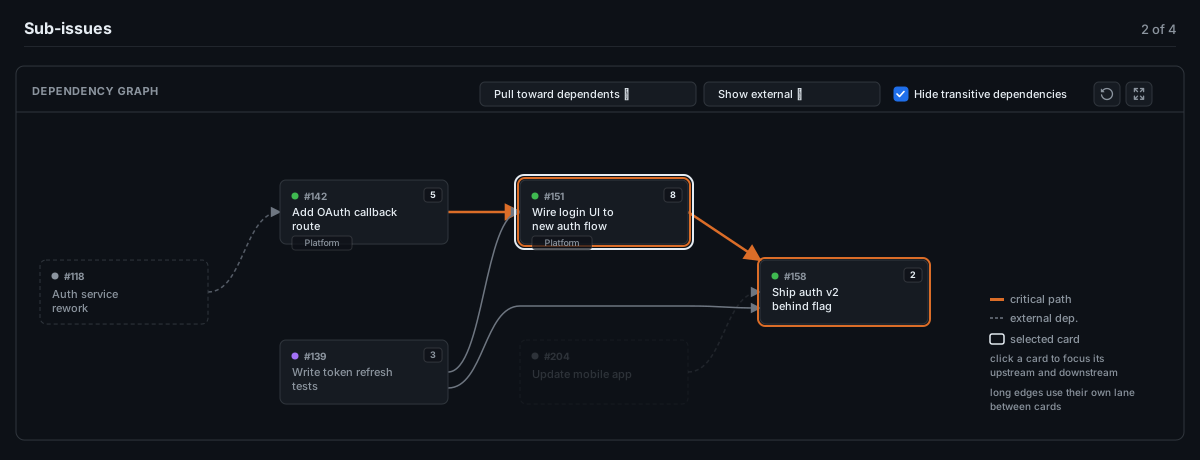
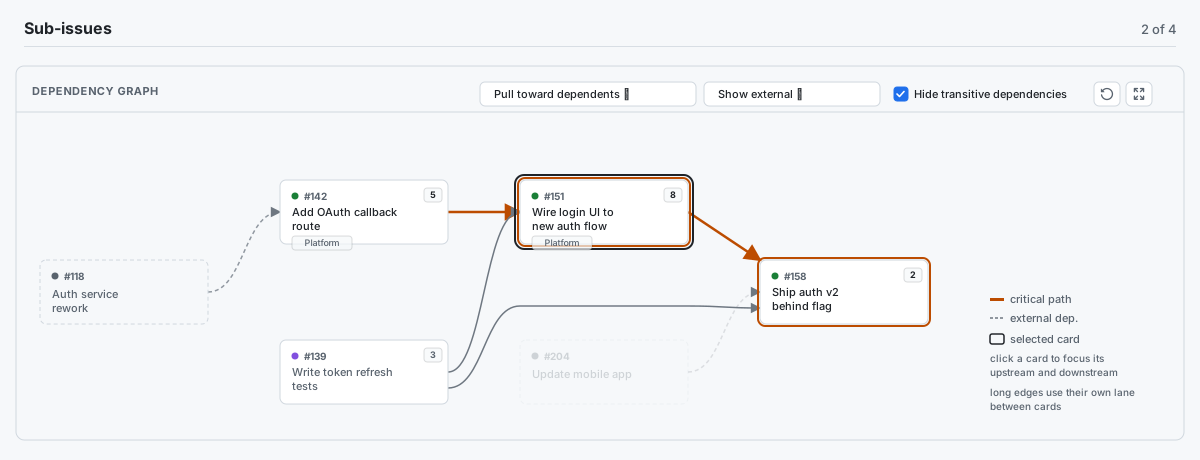
GH Reloaded dependency graph with refresh and full-screen controls, issues connected from left to right and an orange critical path GH Reloaded dependency graph in light mode, showing issues connected from left to right and an orange critical path
Eight focused upgrades

The context your workflow was missing.

Each feature is independent, intentionally small and configurable. Experimental features are clearly marked; some are opt-in while they mature.

01 / STANDUP MODE Updated in v0.12.0

Turn the whole board into a focused standup view.

Select Standup in the board’s filter row, beside the arrows toggle and GitHub’s View button. Open a screen-sharing-friendly view with one slim header, compact columns and the full board still visible. Grouped swimlane bands stay beneath the headers, even in narrow windows. Attention badges surface stale review work, unexplained blocks, critical-path risk and bottlenecks. It is read-only, local to the tab and refreshes its signals while you present.
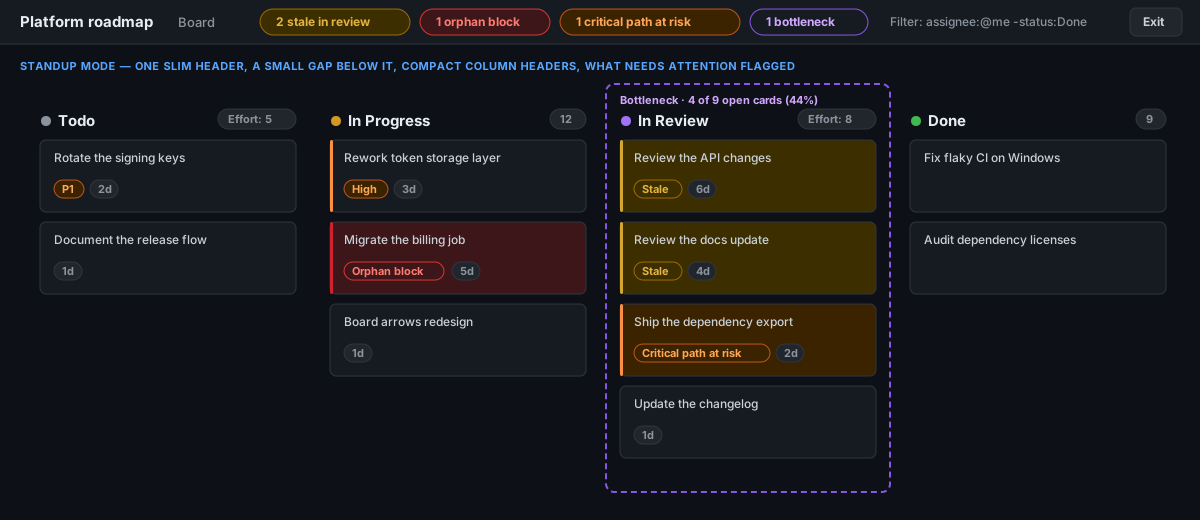
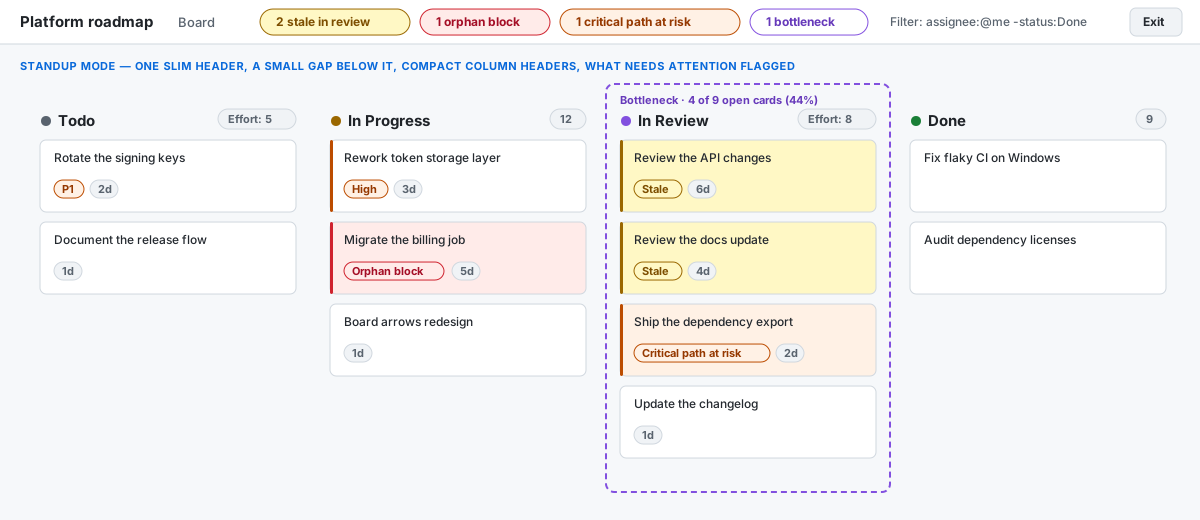
Standup mode in dark theme showing a compact GitHub Projects board with stale, orphan block, critical-path and bottleneck attention signalsStandup mode in light theme showing a compact GitHub Projects board with stale, orphan block, critical-path and bottleneck attention signals
02 / MY ISSUES Updated in v0.11.0

See your work by project and real status.

Turn GitHub’s flat My Issues list into a responsive grid of Project tiles, grouped by each Project’s own Status options. The grid adds columns only when every tile has room to keep issue titles readable; set minimum and maximum tile widths in Settings → Advanced options, or reset the defaults. It follows the current search, filters and Assigned / Created / Mentioned tab, keeps unassigned work in “No Project,” and never changes your issues.

03 / DEPENDENCIES Updated in v0.14.0

Simplify the graph without losing the full picture.

Read complex dependencies with fewer crossings and arrows routed between cards instead of through them. Blockers sit left of what they block; pull cards toward their dependents or choose the earliest possible position. Refreshes preserve the existing order where possible. Transitive edges stay hidden by default, and selecting a card focuses its full chain. Full-screen mode and background refresh remain one click away.

04 / BOARD ARROWS Experimental · Beta

See dependencies directly on the Kanban.

Draw arrows between visible dependent cards, routed along the gutters and behind cards so titles stay readable. Links between two closed or merged items are hidden; hover or focus a card to highlight its connections and fade the rest. Red shows a blocker lagging behind; gray shows a resolved or on-track dependency. Enable the arrows icon beside View in the board’s filter row. This feature is in beta and off by default.

05 / FULL WIDTH

Fit more of the board on screen.

Use spare window space, then let columns shrink to a 150px minimum when space is tight. Titles, cards and swimlane headers stay aligned with the board; long column titles have tooltips. Horizontal scrolling starts when the columns cannot fit at that minimum. On by default, easy to switch off.

06 / QUICK CREATE

Open the right issue form in one click.

Add custom issue shortcuts to the Projects top bar, beside GitHub’s native controls. Choose the label, URL, color and board scope—especially useful when work is filed in a different repository.

07 / HTML PREVIEW Experimental

Preview HTML without leaving GitHub.

Render .html and .htm files from a pull request or repository file page. Open a PR file in a new tab, or use the inline Preview tab beside Code and Blame. Controls now persist through GitHub’s in-page navigation and re-renders, without a manual reload. It is on by default, but remains experimental while GitHub’s integration points mature.

08 / PR TRIAGE Updated in v1.2.0

Know whose move it is.

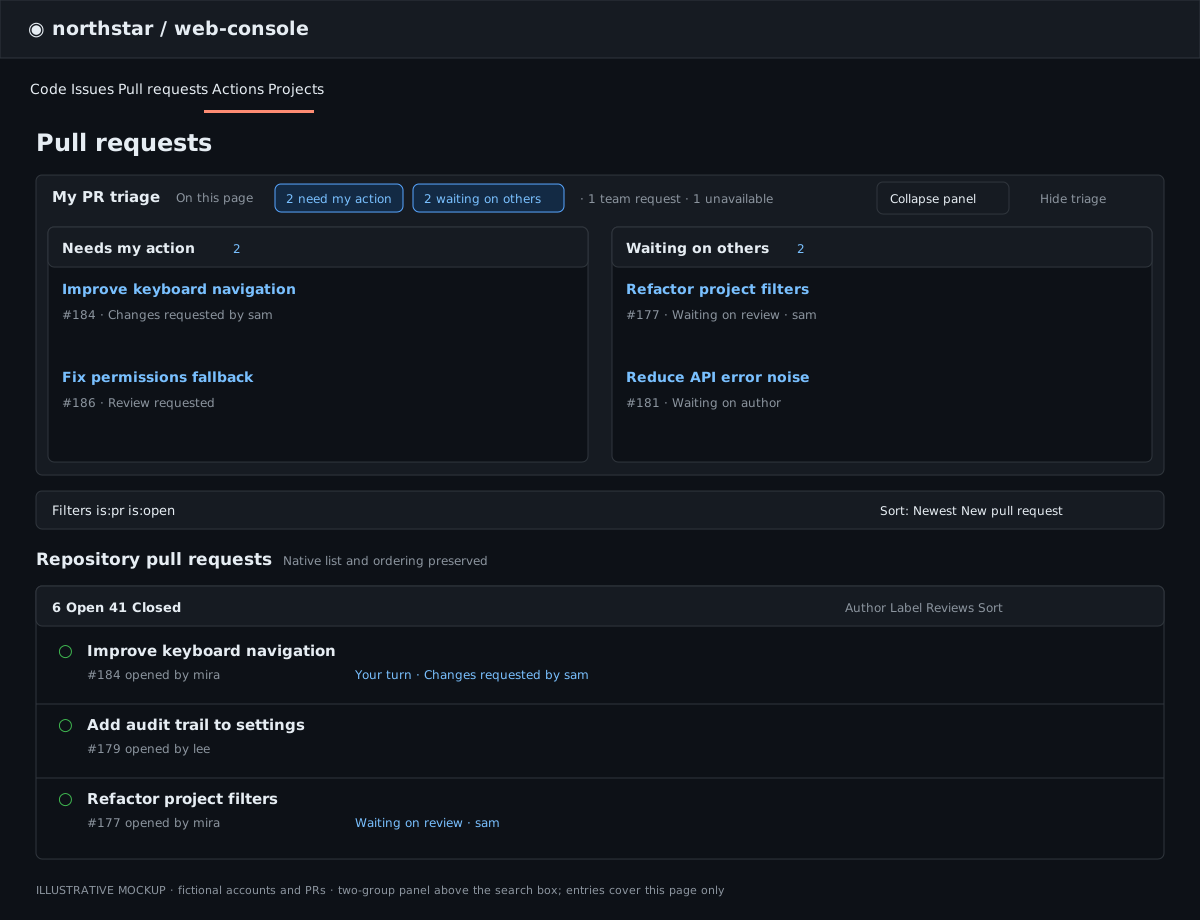
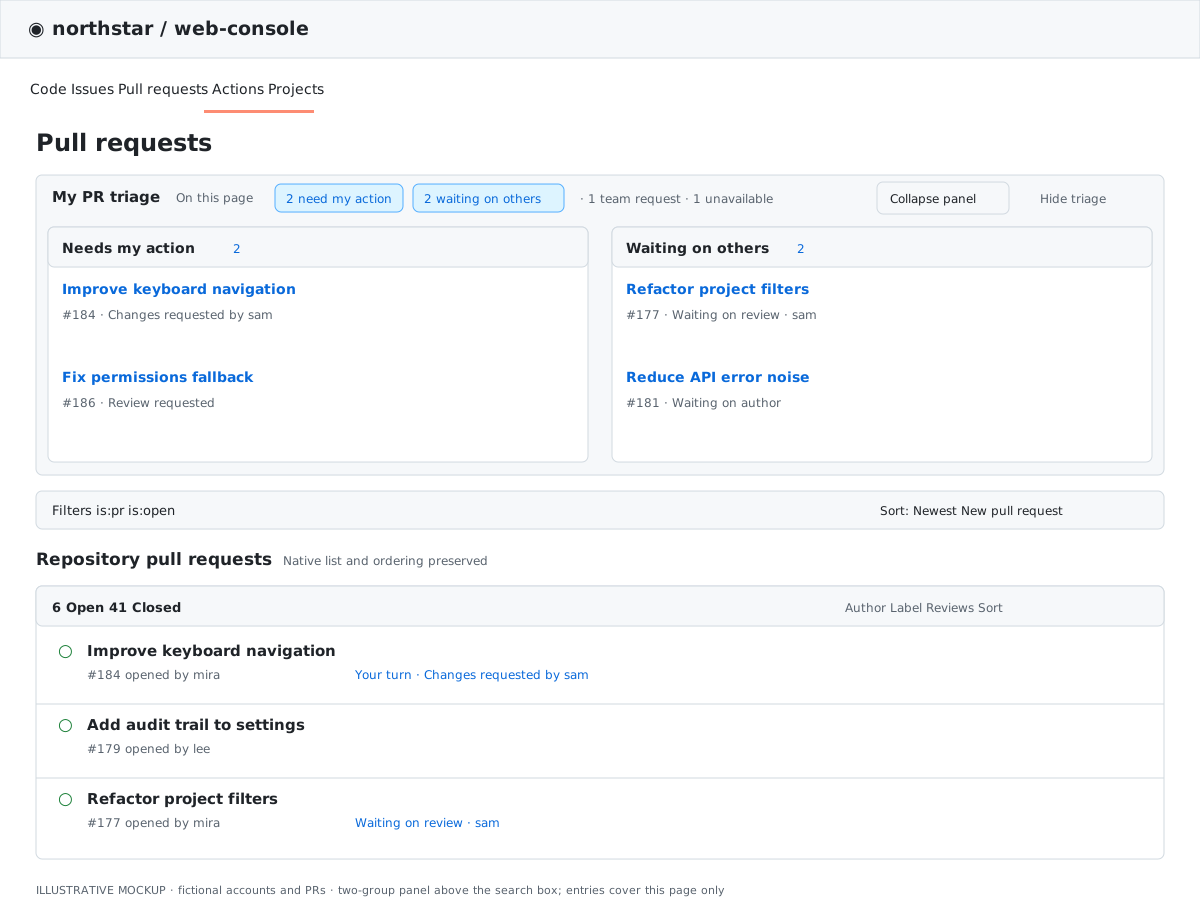
Above a repository’s pull request search, My PR triage groups the current page’s open PRs into “Needs my action” and “Waiting on others.” Each entry links to its PR and explains the next action. Show more expands beyond the first five entries per group; collapsing keeps counts visible. Team requests and unavailable data are counted separately. GitHub’s native list, row labels, filters and pagination stay intact. On by default; hide it on the page or in Settings → Features.

Dark-theme PR triage illustration with Needs my action and Waiting on others groups above the unchanged repository pull request listLight-theme PR triage illustration with Needs my action and Waiting on others groups above the unchanged repository pull request list
Open roadmap

What might ship next.

Public feature proposals update live from GitHub, with status based on discussion activity and linked pull requests. Early ideas share this grid, with their own status and last-updated date. These are possible developments, not release commitments; known bugs are kept separate.

Loading from GitHub
Install GH Reloaded

Up and running in minutes.

Install from the Chrome Web Store, then choose the GitHub token that fits your setup. Prefer the source? Clone the repository and load it unpacked.

Get it from the Chrome Web Store
git clone https://github.com/cattanisimone/gh-reloaded.git
Tokens stay in Chrome storage and are only sent to GitHub. GH Reloaded only reads your data; classic tokens grant broader permissions than fine-grained tokens.
1
Add it to Chrome

Open the Chrome Web Store listing and select “Add to Chrome”.

2
Choose your token

Prefer a fine-grained token for organization Projects. Use a classic token for Projects owned by a personal account. See the setup guide below.

3
Connect and configure

Open GH Reloaded settings, save your token, test the connection and choose your features.

One-time setup

Connect GitHub safely.

A token enables private repositories, Projects data and higher rate limits. Prefer a fine-grained token for organization Projects; personal-account Projects need a classic token. GH Reloaded only reads your data. Public HTML previews work without a token.

1A

Fine-grained token — recommended

Open GitHub’s new token page ↗. Choose a clear name and an expiration that matches your security policy.

  1. Under Resource owner, select the organization or personal account that owns the repositories you want to use.
  2. Under Repository access, select Only select repositories and choose only the repositories GH Reloaded should read.
  3. Leave every other permission at No access.
Repository permissions → IssuesRead-only
Organization permissions → ProjectsRead-only
Repository permissions → Pull requests (PR triage)Read-only
Repository permissions → Commit statuses or Checks (PR checks rollup)Read-only
Repository permissions → Contents (private HTML previews only)Read-only
Organization Projects permission appears only when Resource owner is an organization. Fine-grained tokens cannot read personal-account Projects; use option B below for those. Each token covers one resource owner. HTML Preview remains experimental; Contents is needed only for private files.
1B

Classic token — personal Projects

For Projects owned by a personal account, create a classic token ↗ with read:project and public_repo. Choose repo instead of public_repo only if you also need private repositories.

Classic scopes are broad: public_repo includes write access to public repositories; repo also includes private repositories. GH Reloaded only reads, but a leaked token could do more. Prefer fine-grained permissions whenever they cover your setup. One classic token can cover every owner your account can access.
2

Authorize the organization, if required

A fine-grained token may need approval from an organization owner before it can read organization data. If fine-grained tokens are disabled for the organization, ask an owner to enable them or use a classic token. For a classic token in an SSO organization, open GitHub token settings ↗ and choose Configure SSO to authorize it.

Without organization authorization, GitHub may return empty results or a 404 even when the issue or project exists.
3

Connect GH Reloaded

  1. Open the extension from Chrome’s toolbar and choose Settings, then select GitHub tokens in the sidebar.
  2. Under GitHub tokens, paste your token into Default token and select Save tokens.
  3. Select Test to confirm which GitHub account the token authenticates as.
  4. On that token’s card, select Verify access, enter a repository and optionally an issue, Projects URL or private file, then Run checks. Authentication alone does not confirm access to those resources. Checks are read-only, run only on request, and distinguish denied access, unverified access and temporary errors.
  5. For another organization or personal account, use Add owner token, enter its GitHub owner login and token, then save. Requests use that owner’s token, falling back to the default; tokens are never tried in sequence.
Settings now has separate Features, GitHub tokens, Quick-create and Advanced sections. Use Advanced for Standup thresholds and My Issues tile widths. You can also open it from chrome://extensions → GH Reloaded → Details → Extension options.

Built for people who live in GitHub Projects.

Install GH Reloaded from the Chrome Web Store, or inspect and contribute to the open-source code.